Best Label Makers for Workshop Drawers, Bins, and Toolboxes
Compare Brother PT-D220 and PT-H110 label makers for workshop storage, including tape widths, power supplies, label durability, and refill costs.
For a workshop, choose the tape system before the label maker. A label that you cannot read, replace, or keep attached is poor organization even if the printer has hundreds of decorative symbols. Our shortlist favors standalone Brother P-touch models using TZe tape: the PT-D220 for a bench-based labeling station and PT-H110 for walking around a shop labeling bins in place.
PRODUCTS IN THIS GUIDE
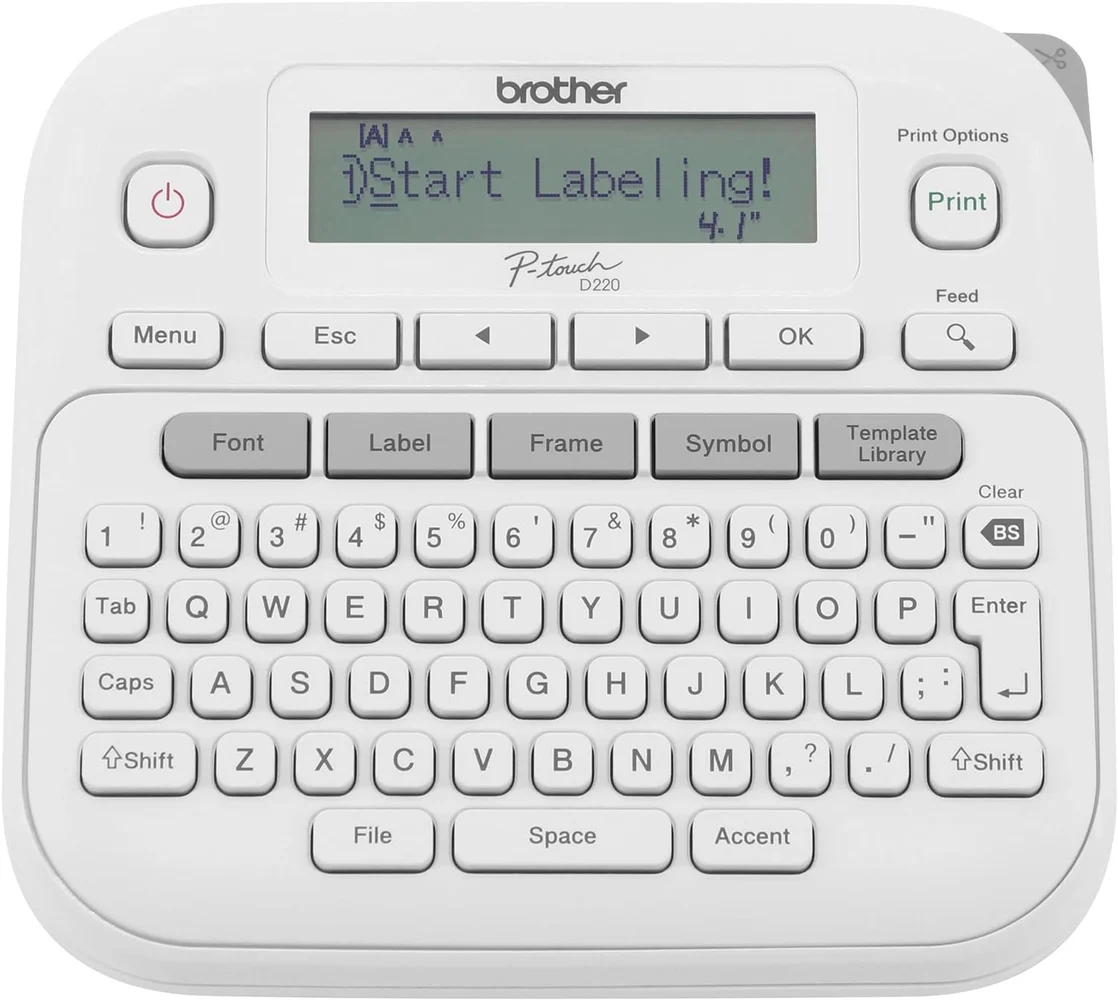
Brother P-touch PT-D220 Label Maker
Standalone keyboard label maker for a bench-based drawer and bin labeling station. Compare tape costs and power supplies as part of the purchase.
Check price on Amazon for Brother P-touch PT-D220 Label Maker (opens in a new tab)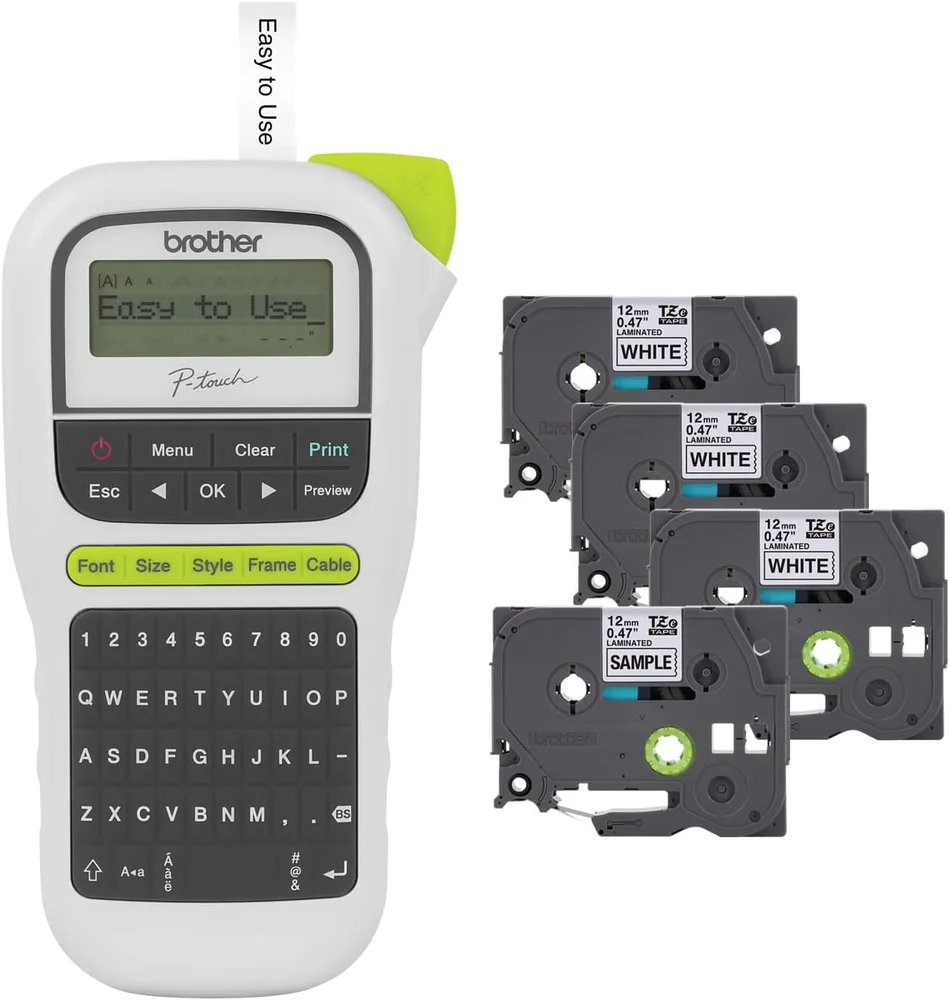
Brother P-touch PTH110BP Label Maker Bundle
Handheld PT-H110 bundle for labeling around a workshop without a phone. Verify the included tape widths and power supplies in the selected package.
Check price on Amazon for Brother P-touch PTH110BP Label Maker Bundle (opens in a new tab)Research buying guide, October 27, 2026. We reviewed Brother documentation and matching Amazon product listings. We have not tested adhesive life, abrasion resistance, print speed, or battery endurance. Our recommendations concern workshop workflow and published capabilities, not a laboratory durability ranking. Affiliate links may earn a commission at no additional cost to you.
The shortlist
| Model | Why consider it | Main limitation | Amazon listing |
|---|---|---|---|
| Brother PT-D220 | Keyboard-based labels for drawers, bins, and shelves | Tape width tops out at approximately half an inch | PT-D220 ↗ |
| Brother PT-H110, including PTH110BP bundles | Handheld layout for labeling around the room | Small display and limited label width | PTH110BP bundle ↗ |
Both models are practical for ordinary identification labels. Neither should be bought as a substitute for a specialist industrial labeling system when your work requires certified materials or a particular identification standard.
Brother PT-D220: our starting point for a labeling station
The PT-D220 manufacturer page specifies TZe tape up to approximately half an inch wide, a QWERTY keyboard, and power from six AAA batteries or an optional AC adapter. Batteries and adapter are not included in the standard manufacturer package, so compare the exact Amazon bundle rather than assuming every listing has the same contents.
The desktop-style layout is appealing when you want to sort a pile of fasteners, create a consistent set of labels, and apply them afterward. Keep the printer beside your sorting trays and use one label format for an entire cabinet. The benefit is repeatability: diameter, length, head type, and thread system can appear in the same order on each drawer.
The width limit is the important compromise. A narrow label can identify a small-parts drawer well, but it is a poor choice for a large shelf sign that needs reading from across the garage. Do not compensate by squeezing an entire inventory description into tiny text. Put a short location name on the front and keep detailed stock information on a separate card or spreadsheet.
We would choose the PT-D220 over a handheld model when most printing happens at a clear bench and you prefer a broader keyboard arrangement. We would skip it if you need a phone-based design workflow, wider labels, or an industrial application beyond the published capabilities.
Check the Brother PT-D220 on Amazon ↗.
Brother P-touch PT-D220 Label Maker
Check price on Amazon for Brother P-touch PT-D220 Label Maker (opens in a new tab)Brother PT-H110: a useful handheld alternative
Brother's PT-H110 documentation lists compatible TZe widths from 3.5 to 12 mm, one- or two-line text, memory for 15 labels, and six AAA batteries or an optional adapter. The small preview display is not backlit. Those details make it a sensible portable tool, with limits that are easy to understand before purchase.
The handheld shape is useful when the label text depends on what you see at each cabinet. Walk the room, identify the location, and label it without returning to a computer. You can also store frequently repeated labels, although a large workshop inventory will exceed a 15-label memory quickly.
Our Amazon link goes to the PTH110BP bundle, not a bare PT-H110. The observed listing described four included tapes. Confirm the tape widths, colors, lengths, and printer model in the selected package; extra tapes are valuable only if you will use them. Do not assume a bundle includes the optional adapter or batteries unless its contents explicitly say so.
The PT-H110 is less attractive for long sessions in poor light because of the small, unlit display. We would set up a well-lit labeling area and avoid composing long strings at an awkward angle over a drawer. For many near-identical labels, write a naming list before printing to reduce mistakes.
Check the PTH110BP bundle on Amazon ↗.
Brother P-touch PTH110BP Label Maker Bundle
Check price on Amazon for Brother P-touch PTH110BP Label Maker Bundle (opens in a new tab)Which tape should you buy for a workshop?
Check that the cassette belongs to the printer's supported family and fits its maximum width. A cassette that looks similar is not enough. Then choose the tape's adhesive and application for the actual surface: a smooth drawer face, rough powder coating, a flexible cable, and an oily machine casting are different jobs.
For ordinary drawer labels, start with high contrast and readable text. Black on white is easier to standardize than a complicated color code. Reserve color for a small number of meaningful distinctions, such as metric versus imperial stock; do not make color the only way to identify a fastener.
Test one label on a representative surface before printing an entire cabinet's worth. Clean and dry the surface according to the tape instructions, avoid bridging a textured recess, and keep the label out of the handle's rubbing path. If you plan to relabel frequently, label a removable holder rather than placing adhesive on a finish you want to preserve.
Neither this guide nor a laminated-tape claim establishes resistance to every shop solvent or chemical. Check the specific tape's documentation for unusual exposure and keep required safety or identification markings intact.
The recurring cost is tape, not just the printer
Compare the cost of a printer plus the genuine tape types you expect to use over a year. Sample cassettes can contain less tape than regular replacements. Also allow for margins and wasted test prints. Batch similar labels when the printer's instructions support it, but do not cut or pull tape through a machine contrary to its manual.
A cheaper printer tied to an inconvenient app or hard-to-find cassette can cost more time than it saves. Conversely, paying for extra fonts is unlikely to improve a drawer labeled “M6 flat washers.” Spend for the width, supply availability, and input method you need.
A naming system that makes the purchase worthwhile
Use our workshop labeling guide to plan the system before you print. For hardware, separate thread systems first and preserve the manufacturer's information for items whose grade or intended use matters. The label maker should record that decision, not replace it.
On a small-parts cabinet, put frequently retrieved sizes at comfortable reach. On portable organizers, label the carrying edge as well as the top so the case can be identified when stacked.
Do I need a phone to use these printers?
These are standalone keyboard models. Choose them specifically if you want to print without depending on a phone app. Check a different model's documentation if phone editing is a requirement.
Can they print large shelf signs?
Their roughly half-inch maximum tape width suits compact labels. Large shelf identification may need wider tape or a different sign format.
Is the cheapest compatible tape a safe equivalent?
Compatibility describes fit, not necessarily adhesive behavior or suitability for a particular exposure. Check the exact supply and test it on the intended surface. We have not compared third-party tape durability.
Which one would we buy first?
The PT-D220 ↗ is our starting point for a fixed sorting station; the PT-H110 bundle ↗ makes sense when portability matters more. Buy one cassette width and finish you actually need before accumulating assorted tape bundles.
Explore the recommendations.
Check Amazon for current product details, available options, and pricing.
Brother P-touch PT-D220 Label Maker
Product details
Standalone keyboard label maker for a bench-based drawer and bin labeling station. Compare tape costs and power supplies as part of the purchase.
- TZe tape up to 12 mm
- QWERTY keyboard
- Six AAA batteries or optional adapter; check bundle contents
Brother P-touch PTH110BP Label Maker Bundle
Product details
Handheld PT-H110 bundle for labeling around a workshop without a phone. Verify the included tape widths and power supplies in the selected package.
- Standalone handheld input
- TZe tape up to 12 mm
- Observed bundle includes four tapes; verify current contents